
What is a sitemap checker?
A sitemap checker is a tool that reads your XML sitemap the way a search engine does and tells you what is wrong with it. An XML sitemap is a file that lists the URLs you want Google, Bing and AI crawlers to find, often with the date each page last changed.
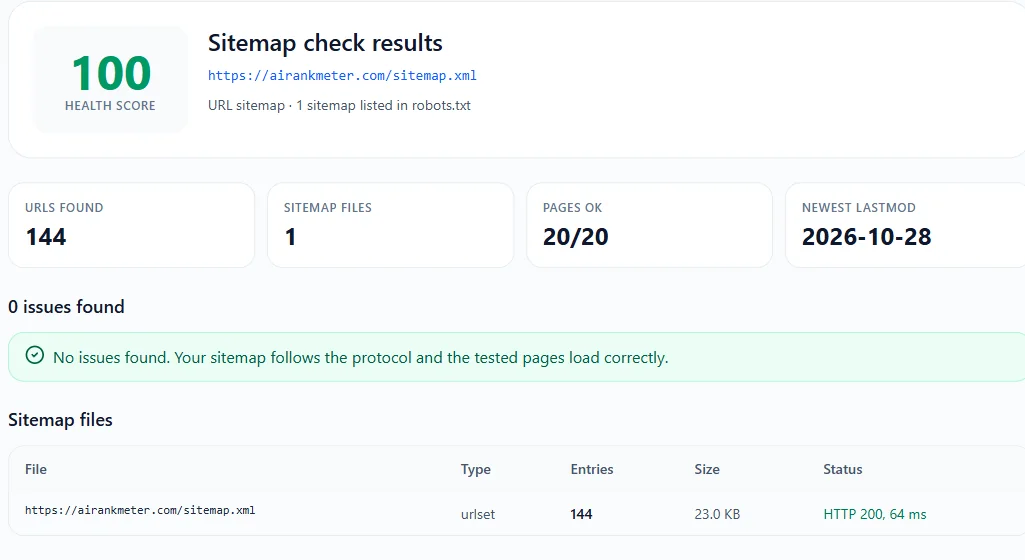
A sitemap can look fine in the browser and still waste crawl budget: it can list pages that redirect, return 404, carry a noindex tag or point their canonical somewhere else. This free sitemap checker validates the file against the sitemap protocol and then requests a sample of the listed pages, so you see both kinds of problems in one report.
How to use the sitemap checker
- 1Enter your domain (example.com) or the full sitemap URL (example.com/sitemap.xml).
- 2Click Check Sitemap. If you entered a domain, the tool reads robots.txt and the common sitemap paths to find the file.
- 3Read the health score and the issues list. Errors come first, then warnings and notices.
- 4Fix the issues in your CMS or SEO plugin, run the sitemap checker again, then resubmit the sitemap in Google Search Console.
What this sitemap validator checks
Every check below is based on the sitemaps.org protocol and Google's sitemap guidelines:
- The file loads with HTTP 200, is valid XML, and uses a <urlset> or <sitemapindex> root with the standard namespace.
- Size and count limits: at most 50,000 URLs and 50 MB (uncompressed) per sitemap file. Gzip files are unpacked and checked too.
- Sitemap index files: every child sitemap is fetched and validated (up to 10 per check).
- Every URL is absolute, on the same domain, uses HTTPS on an HTTPS site, and is listed only once.
- lastmod dates use the W3C format, are not in the future and are not all the same day.
- changefreq and priority use valid values (Google ignores both fields, but invalid values point to a broken generator).
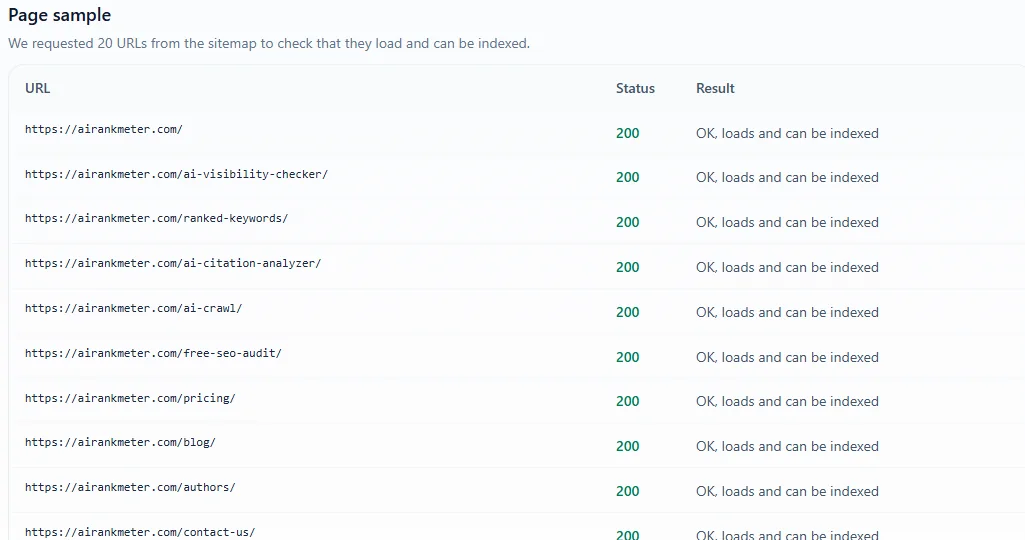
- A sample of listed pages (20 for visitors, 50 with a free account) is requested to catch 4xx and 5xx errors, redirects, noindex tags and canonicals that point elsewhere.
- robots.txt exists and lists the sitemap with a Sitemap: line.
How to find the sitemap of any website
You do not need to know the sitemap URL. Enter the domain and the tool looks in the same places a crawler does:
- Sitemap: lines in yourdomain.com/robots.txt.
- /sitemap.xml, used by Shopify, Wix, Squarespace, Blogger and many custom sites.
- /sitemap_index.xml, used by Yoast SEO and Rank Math on WordPress.
- /wp-sitemap.xml, the built-in WordPress sitemap since version 5.5.
If none of these work, the site either has no sitemap or keeps it at a custom URL. In that case paste the full URL, or check the Sitemaps report in Google Search Console to see which file was submitted.
What a valid XML sitemap looks like
A minimal sitemap is a list of <url> entries, each with a <loc> (the full URL) and an optional <lastmod> date:
<?xml version="1.0" encoding="UTF-8"?>
<urlset xmlns="http://www.sitemaps.org/schemas/sitemap/0.9">
  <url>
    <loc>https://example.com/</loc>
    <lastmod>2026-10-20</lastmod>
  </url>
  <url>
    <loc>https://example.com/services/seo-audit/</loc>
    <lastmod>2026-09-02</lastmod>
  </url>
</urlset>
The file must be UTF-8 encoded, and special characters inside URLs such as & must be escaped as &. When a site has more than 50,000 URLs, split them into several sitemaps and list those files in a sitemap index.
Common sitemap errors and how to fix them
- Sitemap returns 404: the plugin is disabled or the URL changed. Open the plugin settings, regenerate the sitemap and update robots.txt and Search Console.
- HTML instead of XML: the URL shows a web page, often a 404 template or a login wall. Make sure the exact URL returns the XML file.
- Redirected or broken URLs listed: the sitemap still holds old URLs. Regenerate it so it lists only live, final URLs.
- Noindex pages listed: tag, author or thank-you pages are set to noindex but still in the sitemap. Exclude them in your SEO plugin.
- HTTP or www mismatch: the sitemap lists http:// or non-www URLs while the site uses https:// with www (or the other way round). Use the version your canonical tags use.
- Fake lastmod dates: every URL shows today's date. Configure the generator to use the real last update date or leave lastmod out.
- Blocked by robots.txt: the sitemap or its URLs are disallowed. Crawlers cannot use URLs they are not allowed to fetch.
How to submit your sitemap to Google and Bing
In Google Search Console, open Sitemaps, enter the sitemap URL and click Submit. The report then shows when Google last read the file and how many URLs it found. In Bing Webmaster Tools, use the Sitemaps page in the same way. Google retired its old sitemap ping URL in 2023, so Search Console and robots.txt are now the ways to tell Google about a sitemap.
Also add a Sitemap: line to robots.txt so every crawler, including AI crawlers, can find it. You can create that file with our Robots.txt Generator
What a sitemap can and cannot do
A sitemap helps search engines discover URLs and notice updates, which matters most for new sites, large sites and pages with few internal links. It does not guarantee that a page will be crawled, indexed or ranked. Google decides that based on the page's quality, internal links and canonical signals, so a clean sitemap works best together with a solid site structure.