
Free SEO Audit Tool
A-Z SEO Report
Walkthrough
A free SEO audit should tell you three things: what is working, what is broken, and what to fix first. This page walks through the real AI Rank Meter report from top to bottom, so you know exactly what the SEO analysis covers before you run it on your own site: overall score, authority, title and meta, SERP preview, technical SEO, schema, on-page SEO, performance, links, domain age, social signals, local SEO, action items, and SEO, AEO, and GEO coverage.
Direct answer: A free SEO audit is a quick website audit that checks a page for the problems that stop it from ranking in Google or being cited by AI tools. AI Rank Meter runs those checks on the live page and turns them into a readable report: what's present, what's missing, why it matters, and what to fix first. You can add your company name so the report goes out under your brand.
The point isn't to pad the page with SEO jargon. A good audit should let a business owner, marketer, or client understand their page without pulling a developer into the conversation - which is why this report leans on plain explanations, screenshots, score cards, and priority notes instead of dumping raw technical data and calling it a day.
Most people searching for an SEO checker want two things: a fast health check, and a report they can actually act on. This guide keeps both in view - plain language for the quick read, but enough technical depth for developers, SEO specialists, and agency teams to turn findings into real fixes. It also makes it easier to explain progress when the same page gets audited again after changes.
What the audit
covers
Every result is grouped so you're not left guessing what it means. Green means the signal is healthy, red means it's missing or weak, and the warning color means it exists but still needs work. Each section below breaks down the screenshot, the checks behind it, and the practical next step.
That structure also makes the audit easy to hand off. A freelancer can forward it straight to a client, an SEO team can turn it into a task list, and a site owner can compare one report against the next after making changes. The screenshots match the real report exactly, so you know where each finding actually shows up.
White label, free
Put your company name
on the SEO report
The free SEO audit form has a second, optional field: Company name. Type your agency or business name there before you run the audit and the report is issued under it. The cover shows "Report by" with your name, the report header reads "Audit by" with your name, and the same name is carried into the PDF, MS Word, and WordPad downloads.
That turns the free report into something you can actually send. A freelancer can audit a prospect's site, download the PDF, and share it under their own brand. Leave the field empty and the report simply says AI Rank Meter.
Branded report in 3 steps
- 1Paste the URL of the page you want to audit.
- 2Type your company name in the optional field below it.
- 3Run the audit, then download the PDF or Word file.
Without an account you can run 1 audit and download 1 report. A free account removes both limits.
SEO audit, website audit,
or SEO checker?
The 3 terms get used as if they mean the same thing. They overlap, but the depth is different, and knowing which one you need saves time.
SEO checker
A quick pass or fail on common on-page signals: title, meta description, headings, images, and links. Good for a fast look at one page.
SEO audit
A deeper SEO analysis that adds technical SEO, schema, performance, backlinks, and authority, then puts the fixes in priority order.
Website audit
The widest term. It can include SEO plus security, accessibility, usability, and code health across the whole site.
The AI Rank Meter free SEO audit covers the quick checks an SEO checker runs, adds the deeper audit sections, and includes a few website audit signals such as HTTPS, security headers, and JavaScript errors. It audits one URL at a time, so run it on each important page rather than only the homepage.
Green
Signal is healthy enough for audit rules.
Red
Signal is missing, broken, blocked, or too weak.
Yellow
Signal exists but needs improvement.
Priority
Fix crawl, index, metadata, schema, and major content gaps first.
Read score, colors
and priorities
The red labels aren't there to scare anyone. They exist to separate real problems from routine improvement opportunities, so it's obvious what actually matters first.
Treat the score as a working baseline, not a ranking guarantee. A high score can still need stronger content or more authority behind it, while a low score sometimes hides a handful of quick fixes that move the needle fast.
Read it in order, from blockers to improvements. Start with whether search engines can even crawl, index, and understand the page. Then work through title, description, headings, schema, performance, links, and authority. That order keeps the work practical instead of turning the audit into a long, disconnected checklist.
A to Z coverage
What the audit checks
from A to Z
Think of this as the plain-English version of the report - a quick way to explain to a client why the audit bothers with SEO, technical SEO, schema, authority, AEO, GEO, and export-ready reporting all in one place.
Every item earns its spot. Some checks protect visibility - indexability, canonical tags, robots.txt, sitemap signals. Some improve clarity - title tags, meta descriptions, headings, schema, FAQs, direct answers. The rest are about trust: domain authority, page authority, backlinks, social signals, local presence, and AI visibility readiness.
Analyzed URL
Confirms the exact URL used for the audit so the report is not mixed with another page.
Baseline score
Shows the starting SEO score before any fixes, useful for comparing the next audit.
Crawl access
Checks robots.txt, noindex, canonical, sitemap, and crawl signals that affect discovery.
Domain strength
Reviews authority indicators such as DR, DA, PA, backlinks, and referring domains.
Entity clarity
Looks for clear brand, page, service, and topic signals that search and AI systems can understand.
Fix priority
Turns audit findings into high, medium, and low priority action items.
Google preview
Shows how the title, URL, and meta description may appear in search results.
Heading structure
Checks whether the page has a clear H1 and useful heading hierarchy.
Images and alt text
Reviews image optimization and whether important images have descriptive alt text.
JavaScript issues
Flags page errors or scripts that may affect loading, rendering, or user experience.
Keyword focus
Shows top visible keywords and whether the page topic looks consistent.
Local SEO
Checks local business signals where a page represents a location, office, clinic, or service area.
Metadata
Reviews title tags, meta descriptions, character counts, and suggested improvements.
Navigation links
Reviews internal and external link counts so the page is not isolated.
Optimization gaps
Highlights missing schema, weak content, missing social links, and other improvement opportunities.
Performance
Checks speed, page size, server response, Core Web Vitals style metrics, and resource load.
Question readiness
Checks whether the page has answer-style content and FAQs for AEO.
Report exports
Supports sharing the audit as a report for clients, developers, writers, or internal teams.
Schema markup
Detects structured data and recommends relevant schema types without duplicating warnings.
Trust signals
Checks social profiles, security, authority, brand clarity, and content credibility signals.
Usability
Looks at mobile-friendly and user-experience signals that support search performance.
Visibility gaps
Combines SEO, AEO, and GEO checks to show where the page can be easier to find and cite.
Word count
Shows whether the page has enough crawlable, useful text for the topic.
XML sitemap
Checks sitemap availability so search engines can discover important URLs.
Your next step
Gives plain-language recommendations so the audit becomes a real work plan.
Zero duplicate confusion
Keeps related warnings grouped so the same issue is not repeated in multiple places.
Report identity
Comprehensive SEO Audit
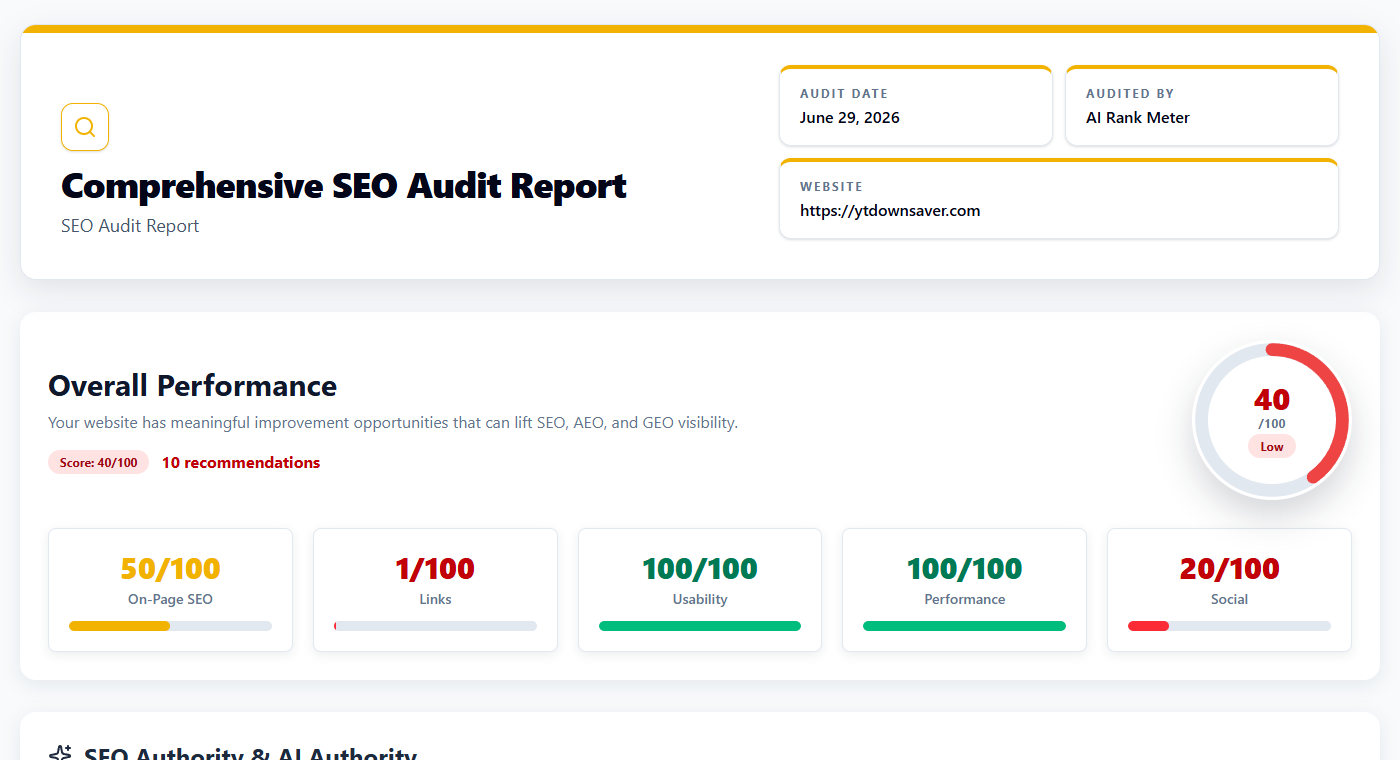
Report cover
The cover is deliberately plain: which URL was checked, when the report was generated, and who produced it. That matters more than it sounds - agencies and freelancers who send reports to clients know how easily an old report and a new one get mixed up in an inbox. A clean cover also turns the export into a proper audit document instead of a random browser screenshot.
What to do next
Glance here first and confirm the right page was audited before you read anything else. Wrong URL showing up? Re-run the audit on the exact page you actually want to improve.

Quick health snapshot
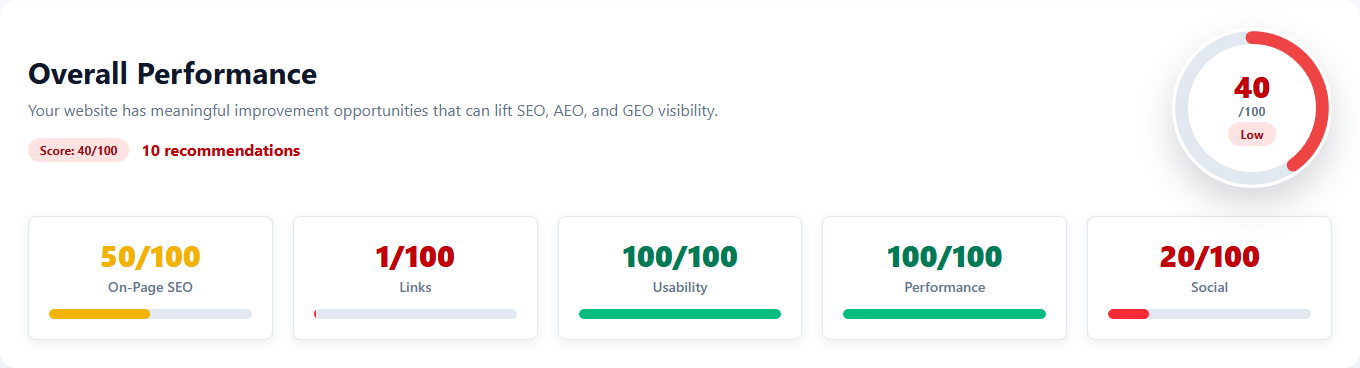
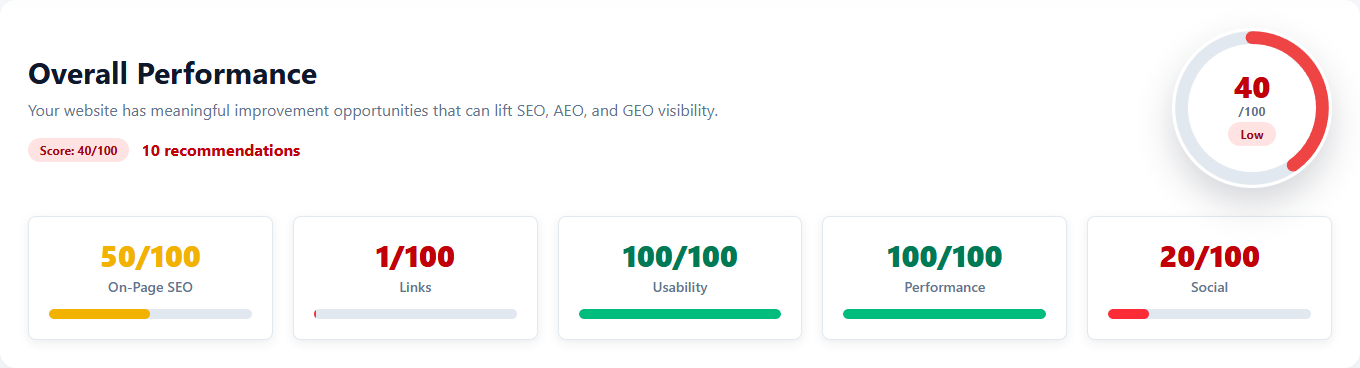
Overall Performance score and
category breakdown
This is the part most people screenshot and send to their boss. One look tells you whether the page is healthy, average, or in trouble. The category cards keep that single number honest - a page can be fast but link-starved, or usable but weak on-page, and a blended score would hide that. Splitting it out points at the actual problem instead of burying it.
What to do next
Find the lowest category and start there. Links near zero usually means an authority problem. Weak On-Page SEO means titles, meta, headings, content, and schema need attention before you bother with anything smaller.
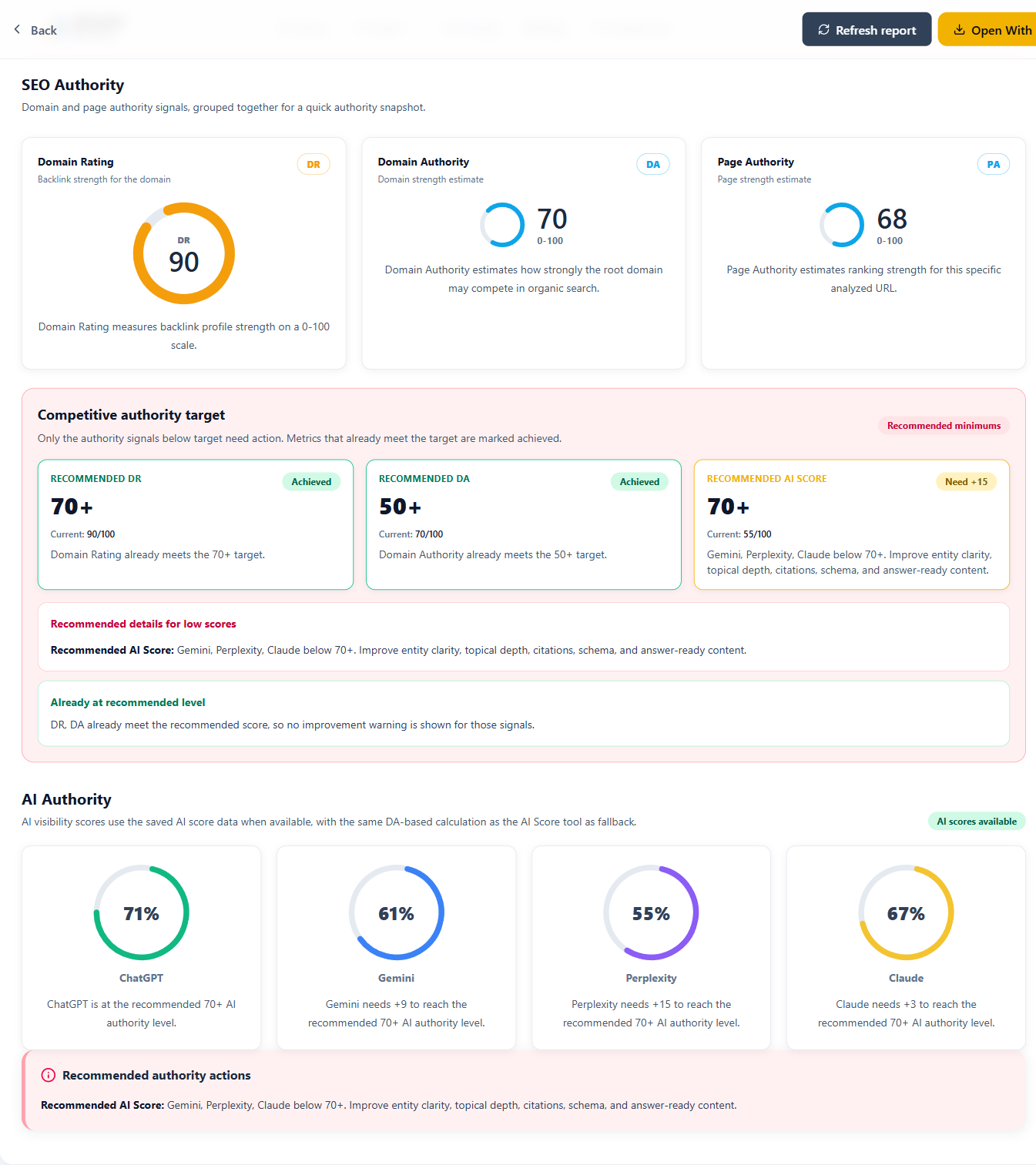
Authority snapshot
SEO Authority and AI
Authority scores
Authority is the trust test: does the site have enough weight to actually compete? Backlink authority and AI authority sit side by side here because visibility today isn't just a Google rankings game anymore. A page can be technically spotless and still underperform if the domain has no link strength, no entity clarity, and no trust signals backing it up. The recommended targets give you a sense of how far off a competitive baseline the site currently is.
What to do next
Low DR, DA, or AI authority means it's time to invest in topical content, internal linking, schema, brand consistency, citations, and real backlinks. If a score is already solid, don't waste effort chasing it further - focus elsewhere.
Search snippet basics
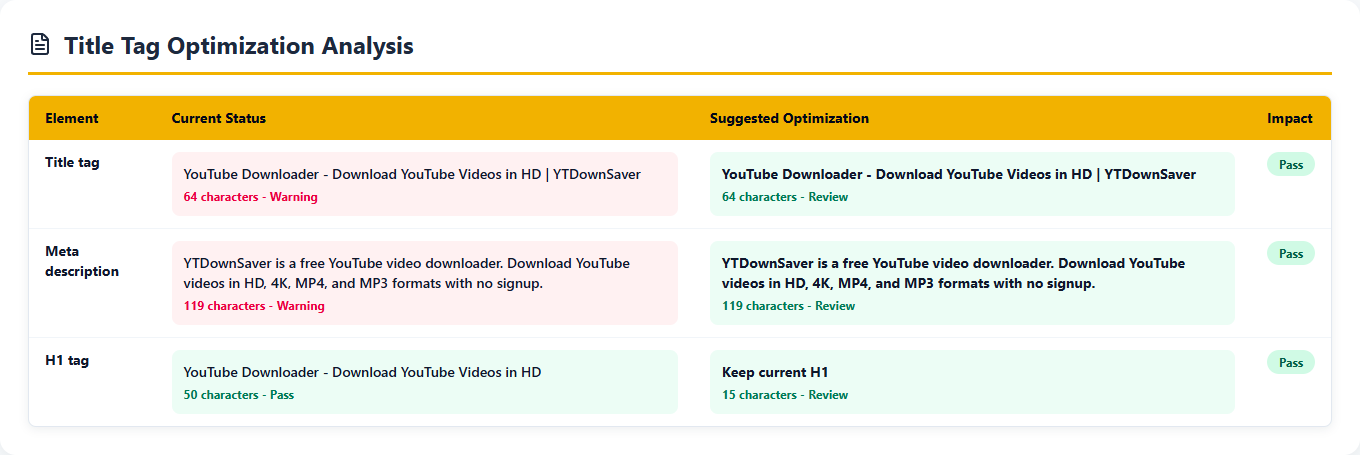
Title Tag
Optimization Analysis
Arguably the highest-leverage section in the whole report, because it puts your current title next to a suggested one and lets you see the gap immediately. A weak title quietly costs you relevance and clicks even when the page itself is genuinely useful - and the meta description has the same problem. The audit flags text that's too long, too short, vague, missing intent, or just not compelling enough to earn a click.
What to do next
Rewrite the title so it describes the page clearly, works the main topic in naturally, and still reads like something a human wrote. Treat the meta description as a one-line pitch for why someone should click, not a place to cram keywords.
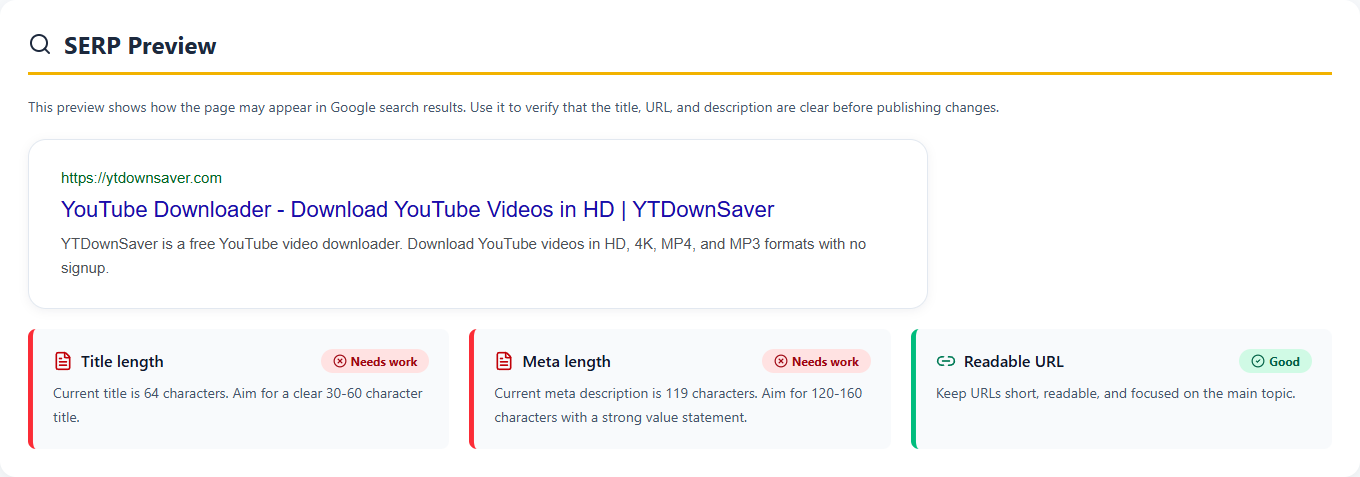
Google-style preview
SERP Preview for title, URL,
and description
Metadata is abstract until you see it rendered the way a searcher actually will. This preview shows that, before you touch a single line of code. It's a reminder that SEO isn't only about ranking - it's about earning the click once you're there. A sharp title and description directly move click-through rate when the page shows up in results.
What to do next
Check whether the title makes sense at a glance. If it reads vague or generic, rewrite it. A long, messy URL is also worth a cleaner permalink on future pages.
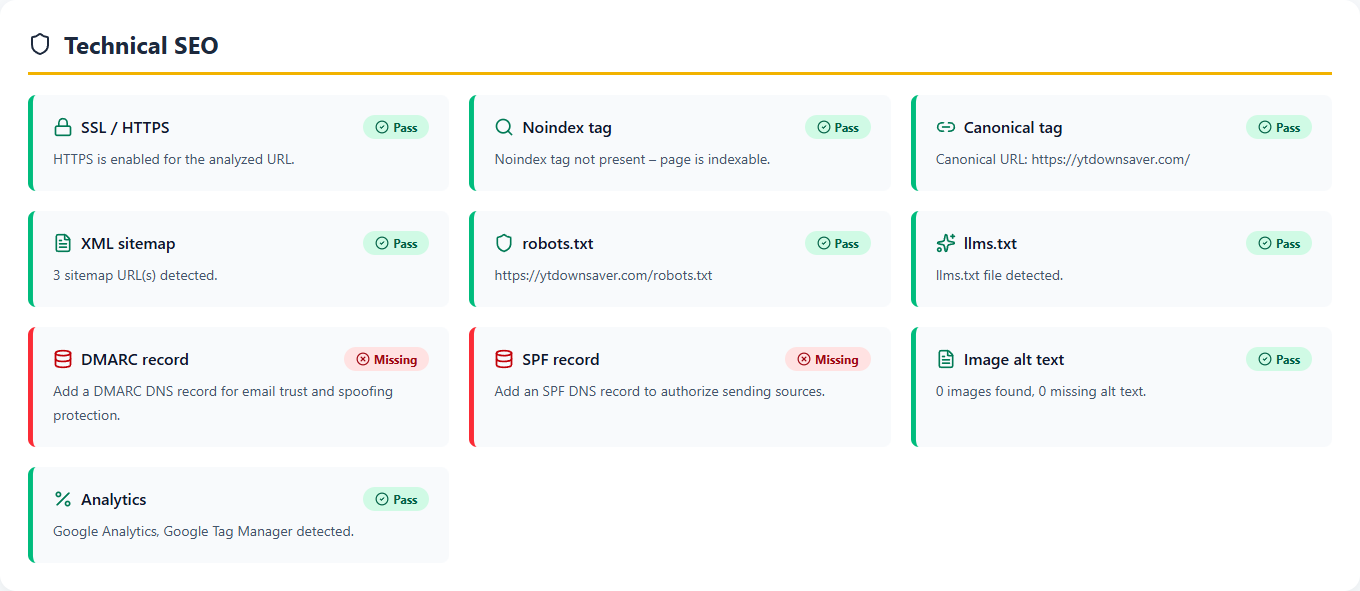
Crawl and index checks
Technical
SEO checks
Good content doesn't matter if search engines can't crawl, index, or trust the page in the first place - that's what this section protects. A noindexed, blocked, mis-canonicalized, or error-riddled page can be ignored by search engines no matter how strong the writing is. Keeping these signals together lets developers and site owners separate a technical problem from a content problem at a glance.
What to do next
Clear the blockers first: noindex tags, broken canonicals, blocked crawl paths, a missing sitemap on a larger site, HTTPS issues, or serious JavaScript errors. None of the content work matters until search engines can actually reach and read the page.
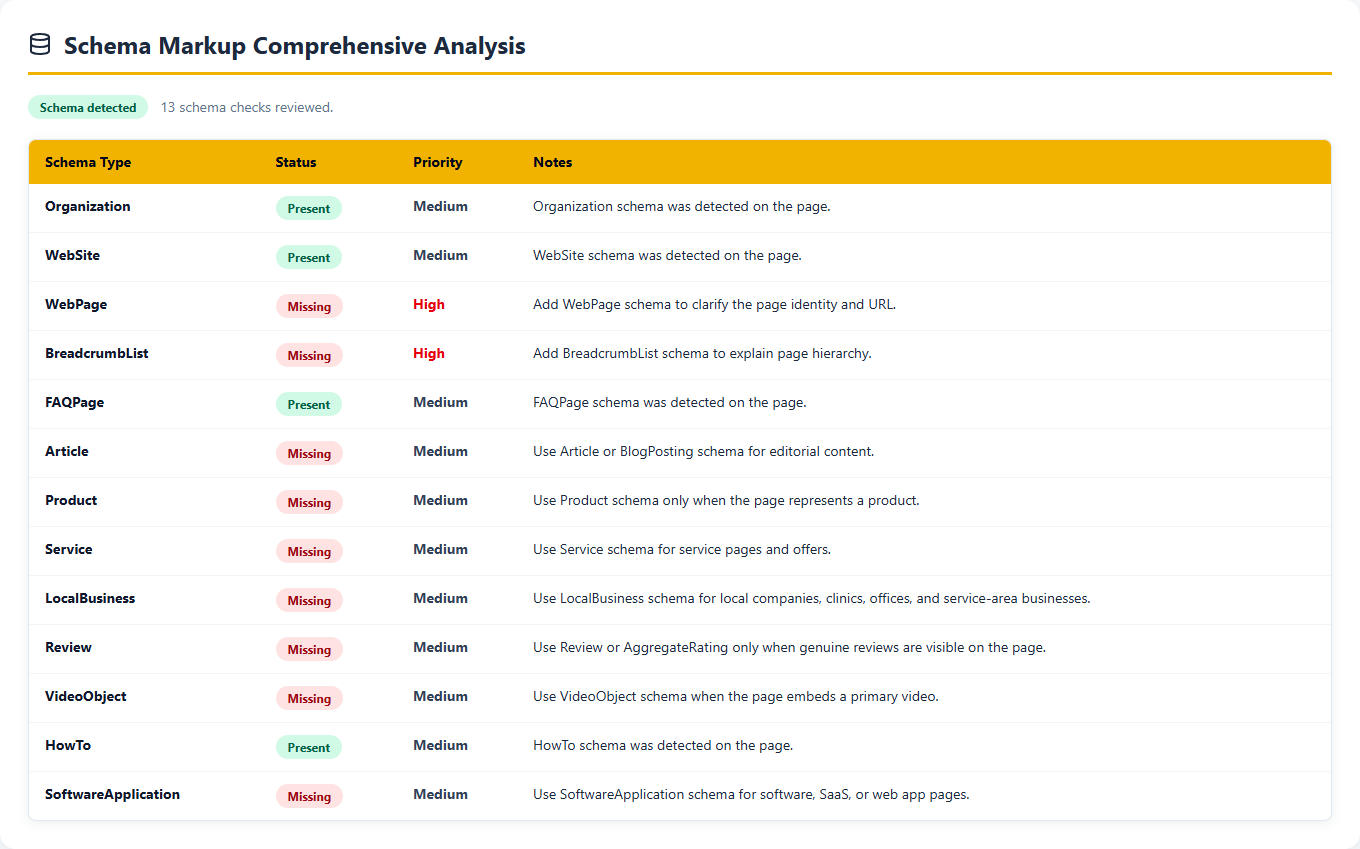
Structured data
Schema Markup
Comprehensive Analysis
Schema is how you tell search engines and AI systems what a page actually represents, instead of leaving them to guess from the layout. This list shows what's detected versus missing, along with priority and notes. Relevance is the part people get wrong most often - Product schema bolted onto a regular article, or FAQ schema added when there are no visible FAQs, tends to do more harm than help.
What to do next
Only add schema that matches what's actually on the page. WebApplication or SoftwareApplication fits a tool page. Article and FAQPage suit a guide. LocalBusiness and BreadcrumbList make sense for a local business.
Content and page signals
On-Page
SEO Analysis
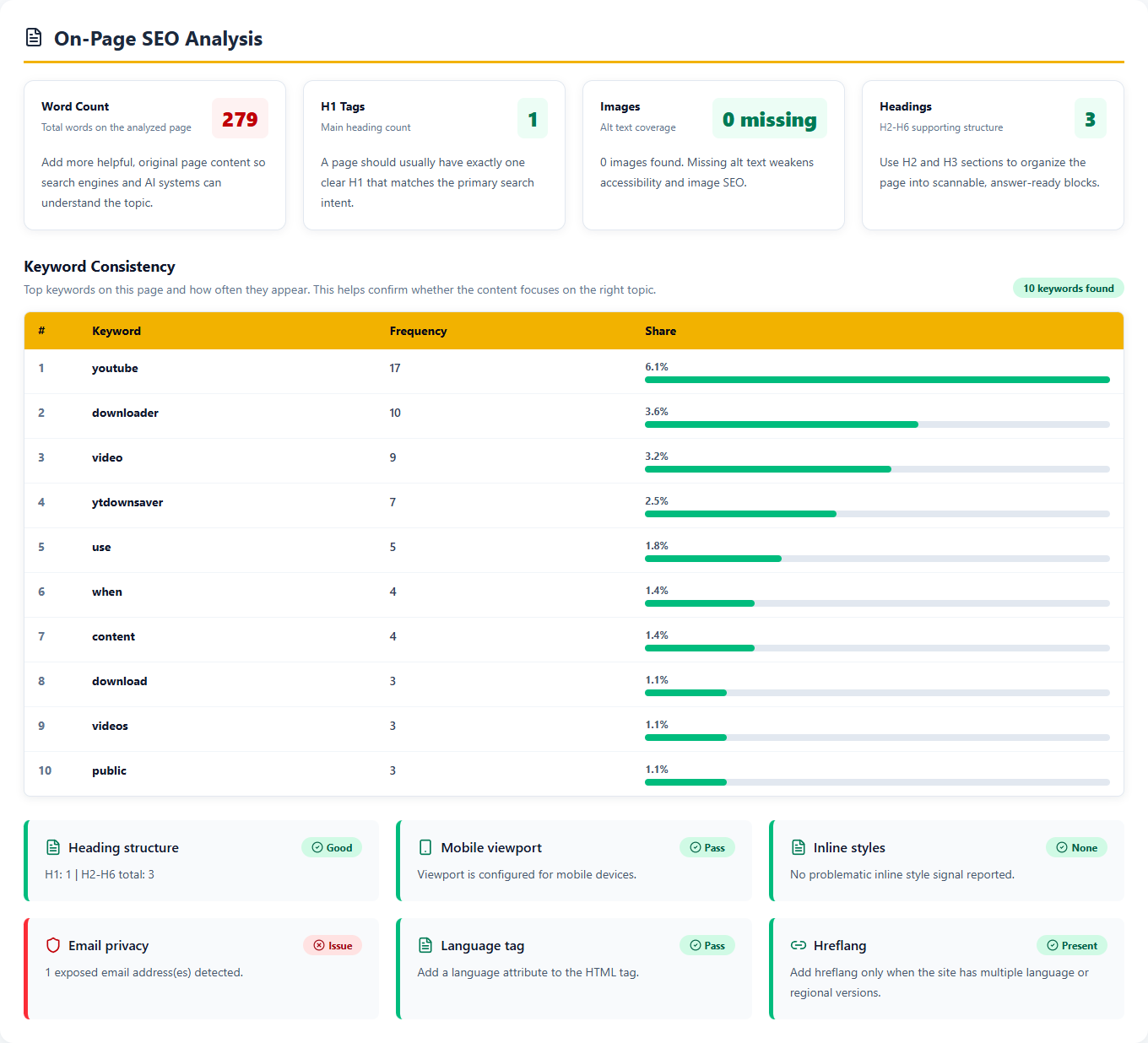
This is the page giving search engines enough to actually work with - or not. Thin text often means the topic isn't being explained well enough. Multiple, conflicting H1 tags weaken the page's structure. Missing alt text quietly hurts both accessibility and how well images get understood. Keyword consistency is the tell for whether the visible content genuinely focuses on the topic the page is trying to rank for, or just mentions it in passing.
What to do next
Improve it the way an actual reader would want: one clear H1, headings that earn their place, enough original text to cover the topic properly, internal links to related pages, descriptive alt text, and keywords that show up naturally instead of stuffed in.
Speed and Core Web Vitals
Performance and page
speed checks
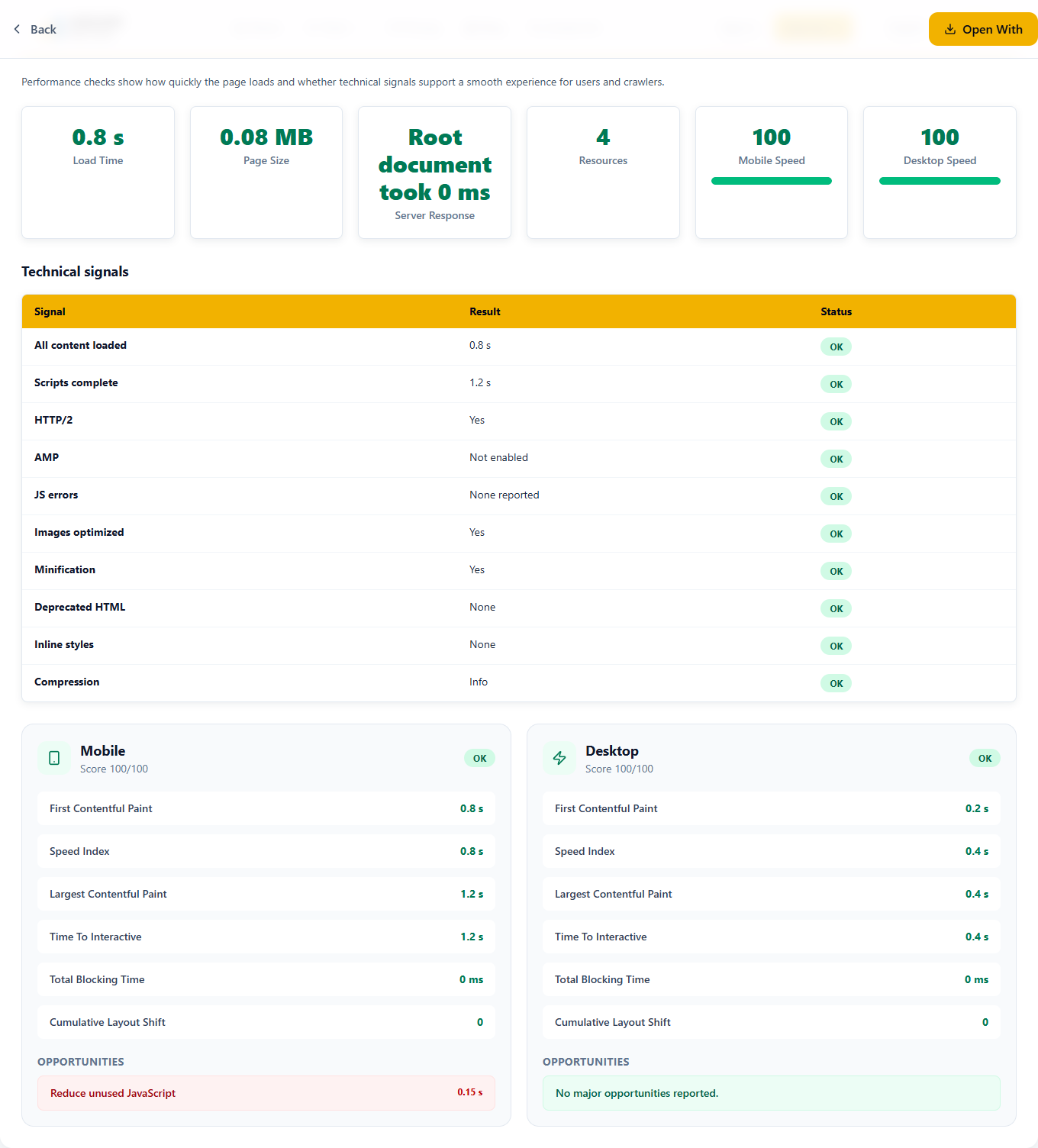
Speed is comfort, and comfort converts. A fast page is easier for users, easier for crawlers, and easier on whatever conversion path it's part of. Mobile and desktop get split out here because the same page can genuinely behave differently on each - and the report lists the specific culprits, whether that's unused JavaScript, heavy files, unoptimized images, or resources that delay rendering.
What to do next
Where performance is weak, compress images, drop unused scripts, trim third-party bloat, turn on caching and compression, and keep an eye on layout shift. Skip the obsession with a perfect score - fix what actually changes the user's experience.
Backlinks and page links
Link profile and
authority checks
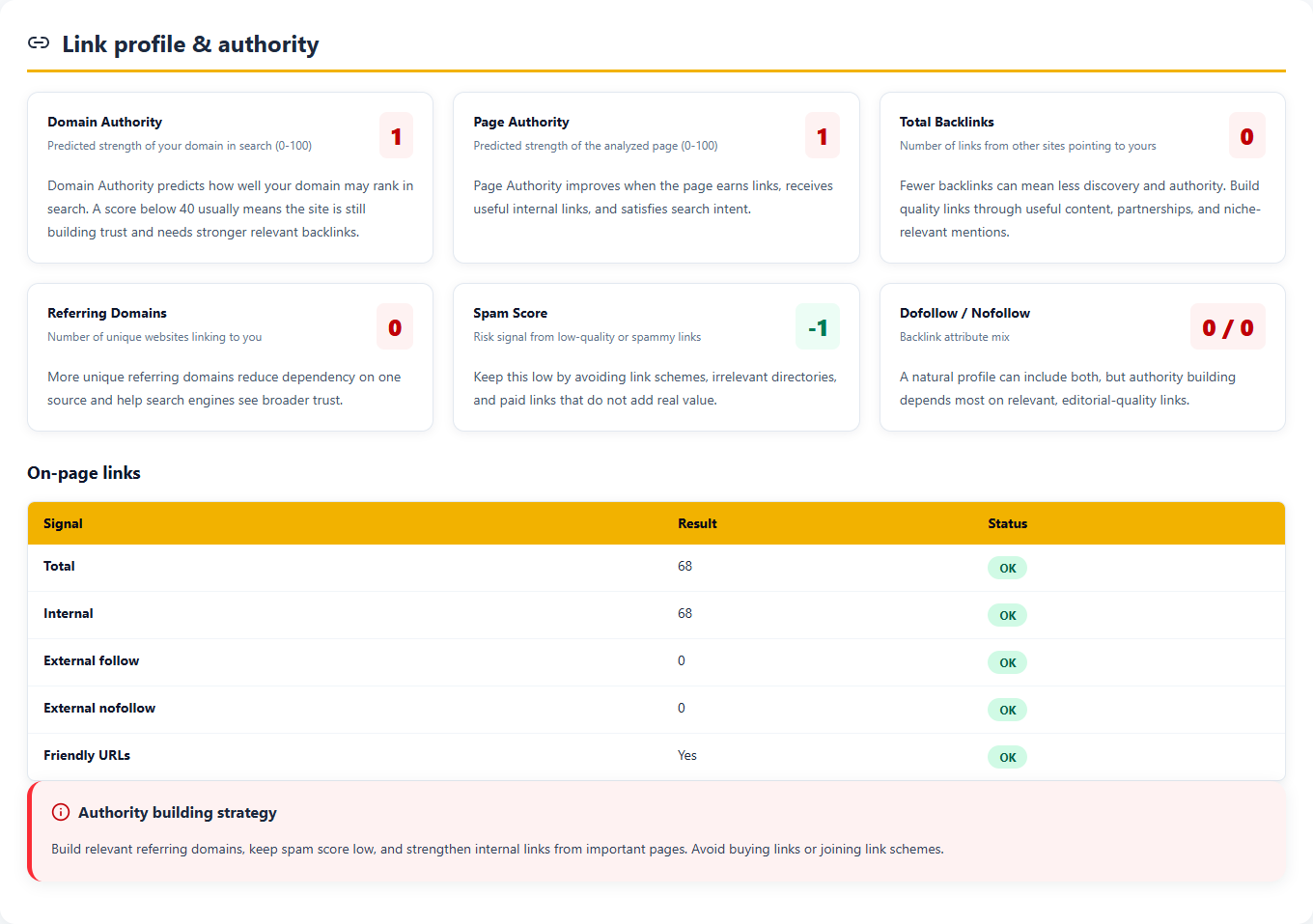
Links tell two stories at once: authority and structure. Backlinks and referring domains show how much outside trust the site has actually earned. Internal links show whether this page is even connected to the rest of the site. External links, used carefully, can add credibility too. Surfacing all three makes it obvious whether the real problem is weak authority, weak internal linking, or both at once.
What to do next
Link to this page from related pages on the site - that part is free and often skipped. Earn backlinks through genuinely useful content, real partnerships, digital PR, niche directories, and brand mentions. Stay away from low-quality link schemes; they create risk, not authority.
Domain history
Domain age and
registration details
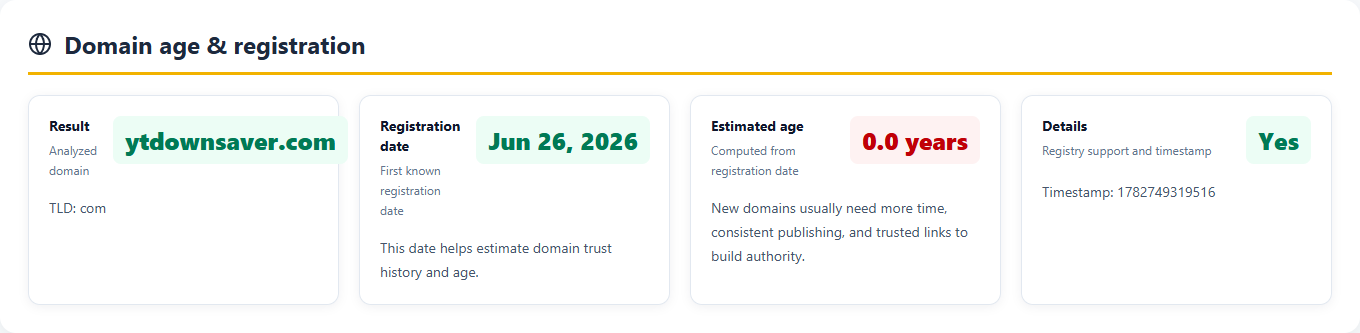
Domain age won't move rankings on its own, but it's useful context. A brand-new domain typically needs more time, content, links, and accumulated trust before it can compete with established ones. Knowing the registration date helps separate "this site is genuinely weak" from "this site is just new."
What to do next
If the domain is new, focus on publishing useful pages, building brand consistency, earning real mentions, and keeping technical SEO clean. Don't expect to outrank older domains in a competitive niche overnight - that timeline doesn't exist.
Local business signals
Local SEO and Google Business
Profile checks
This one's situational - it only matters for pages tied to a physical business, office, clinic, or service area, but when it applies, it matters a lot. The check looks for LocalBusiness schema and enough local context on the page for users and search engines to understand where the business operates. It reads the page, not your Google Business Profile account, so reviews and ratings still need checking in the profile itself.
What to do next
Local business page? Add LocalBusiness schema, visible NAP details, service area information, a map or contact details, and links to official profiles. Not a local page? Treat the missing local schema as informational, not urgent - it doesn't apply here.

Priority list
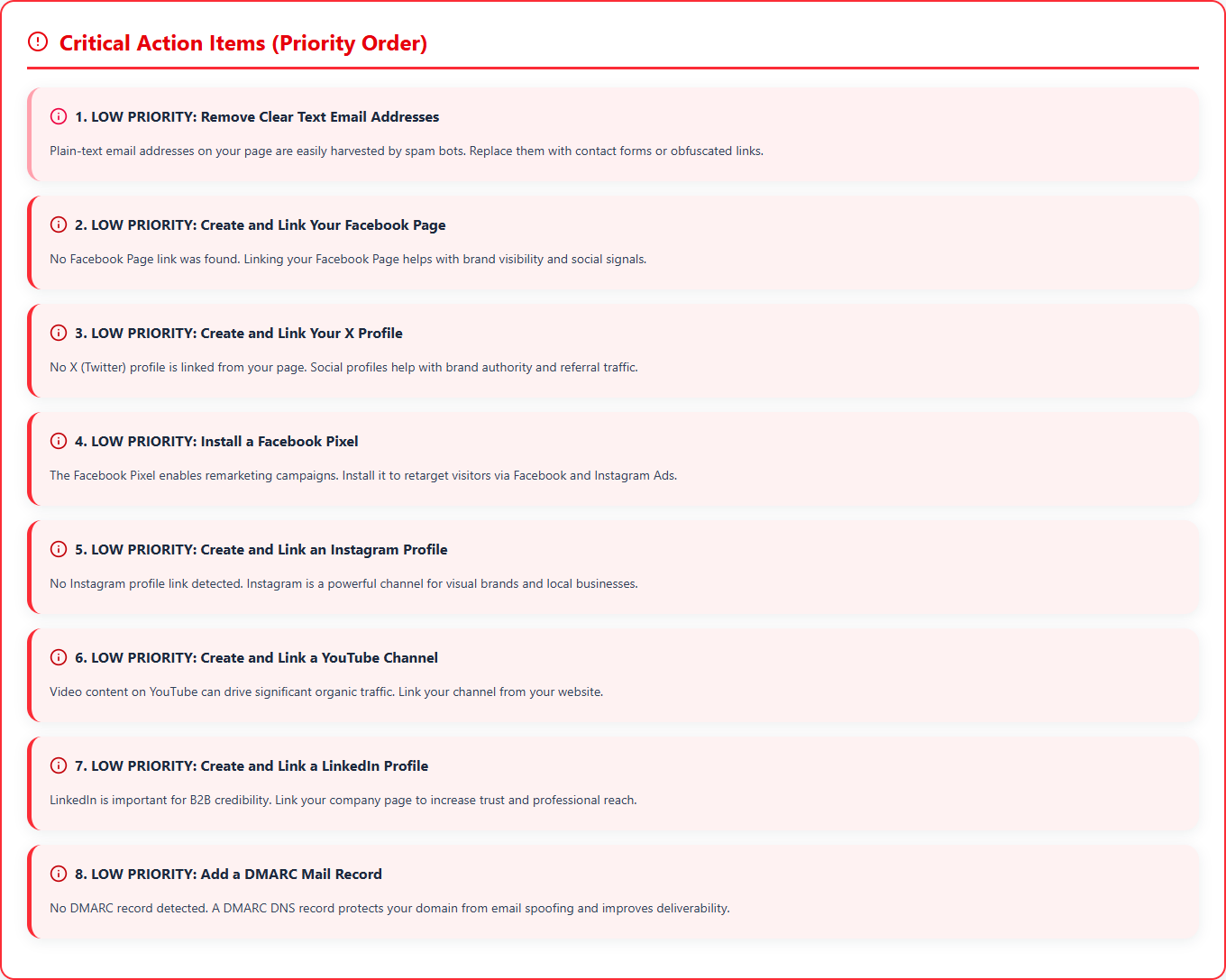
Critical Action Items in
priority order
This is where the audit stops being a list of metrics and turns into an actual to-do list. Knowing what's wrong is only half the job - knowing what to fix first is the other half. Recommendations are grouped by priority so a site owner, SEO specialist, writer, or developer can start fixing things without re-reading every technical detail first.
What to do next
Work the high-priority items first - indexability, titles, schema, content gaps, and serious performance problems. Medium and low priority items, like social profile links, pixels, and extra trust signals, can wait until those are handled.
Search and AI visibility
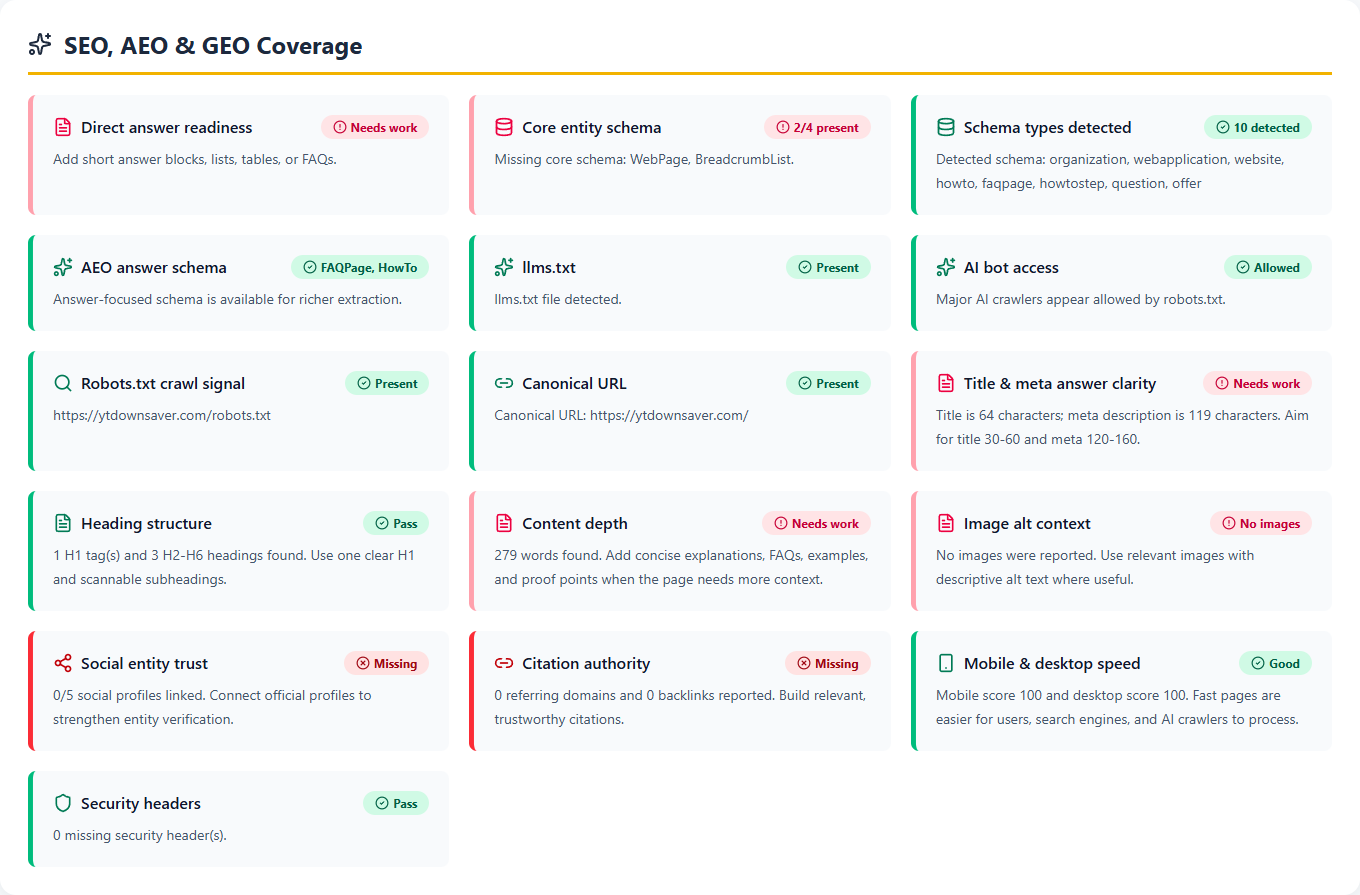
SEO, AEO and GEO
Coverage checks
Classic SEO gets pages ranked. AEO gets them answering questions clearly. GEO gets them understood, summarized, and referenced by AI systems. This section is where those three meet - checking for direct answers, structured content, schema, AI bot access, entity clarity, content depth, and citation-ready signals.
What to do next
Add short, direct answer blocks, genuinely useful FAQs, tables or lists where they help, clear entity descriptions, supporting references, and schema that fits. The goal is a page that's easy for a human and an AI system to understand, without burying the context either one needs.
Recommended workflow
How to use the audit report after it loads
- 1Confirm the correct URL is shown in the report cover.
- 2Check the Overall Performance score and find the lowest category.
- 3Fix technical blockers such as noindex, canonical, robots, sitemap, HTTPS, or errors.
- 4Rewrite weak title tags and meta descriptions using the suggested guidance.
- 5Add relevant schema only when it matches visible content on the page.
- 6Improve thin content, headings, internal links, image alt text, and keyword focus.
- 7Review backlinks, DR, DA, PA, and authority gaps before planning outreach.
- 8Use Critical Action Items as the final priority list, then re-run the audit.
Issues you should
never ignore
Most audit findings are minor improvements. A handful aren't. Noindex tags, incorrect canonical URLs, blocked robots rules, missing HTTPS, broken page rendering, severe JavaScript errors, and very weak title tags can all quietly stop a page from performing, even when it looks perfectly fine to a human visitor. Check these before touching design tweaks or low-priority social items.
Content clarity is the next tier. A weak word count, unclear heading structure, missing schema, no direct-answer content, or poor keyword consistency usually means the page isn't explaining its topic strongly enough. That hurts traditional SEO, but it also hurts AEO and GEO - AI systems need clean structure and clear answers before they'll summarize or cite a page with any confidence.
Authority is more of a long game than a fire to put out. Low DR, DA, PA, backlinks, or referring domains don't necessarily mean something's broken - they usually mean the site needs more trust to compete. Fix technical and on-page issues first, then build authority over time with better content, real mentions, internal links, and backlinks worth having.
Related tools for
deeper checking
The free SEO audit gives you the full page-level view. When you need to go deeper, pair it with authority checks, AI visibility checks, keyword data, and Google rank checks. That keeps technical SEO, content planning, authority building, and rank tracking inside one workflow instead of five different tabs.
FAQs
Questions users ask before
running a free SEO audit
1How can I check my website's SEO for free?+
Paste your URL into the AI Rank Meter free SEO audit and run it. You get a full report with an overall score, technical SEO, schema, page speed, backlinks, and a priority list of fixes. There is nothing to pay, and you can run your first audit without an account.
2What is a free SEO audit and what does it check?+
A free SEO audit is a website audit you can run without paying that checks a page for the issues holding back its rankings and AI visibility. This one covers title and meta tags, a Google preview, technical SEO, schema, on-page content, speed, links, authority, domain age, social links, local signals, and SEO, AEO, and GEO coverage.
3Is there a free SEO audit tool that doesn't need a signup?+
Yes. Without an account you can run 1 free SEO audit and download 1 report. A free account removes both limits, so you can audit and download as often as you need.
4Can I put my own company name on a free SEO audit report?+
Yes. The audit form has an optional Company name field. Whatever you type there appears as "Report by" on the report cover and is carried into the PDF, MS Word, and WordPad downloads. Leave it blank and the report shows AI Rank Meter.
5How do I make a white label SEO report for a client for free?+
Run the free SEO audit on your client's URL with your agency name in the Company name field, then download the PDF. The report goes out under your name.
6What's the difference between an SEO audit, a website audit, and an SEO checker?+
An SEO checker gives a quick pass or fail on common on-page signals. An SEO audit goes deeper and adds technical SEO, schema, performance, links, and authority, with fixes ranked by priority. A website audit is the widest term and can also cover security, accessibility, and code health. The AI Rank Meter free SEO audit covers the first 2 and some website audit signals such as HTTPS and security headers.
7Why is my website not showing up on Google?+
The usual causes are a noindex tag, a robots.txt rule that blocks crawling, a wrong canonical tag, no XML sitemap, or a new site with very little authority. The technical SEO section of the audit checks the first 4 directly, and the authority section shows DR, DA, and backlinks so you can see whether the site is simply too new or too weak to compete yet.
8How do I know if my website is SEO friendly?+
Run an SEO audit and look at 3 things: no crawl or index blockers, clear on-page basics (title, meta description, 1 H1, enough useful text, image alt text), and reasonable mobile speed. The report marks every check green, yellow, or red, so the weak spots are easy to find.
9Can ChatGPT and other AI tools read my website?+
The SEO, AEO and GEO section checks the signals that help: whether robots.txt allows AI crawlers such as GPTBot, ClaudeBot, and PerplexityBot, whether an llms.txt file exists, schema, entity clarity, and answer-ready content. These help AI systems read and cite a page, but no audit can guarantee that an AI tool will mention you.
10What are AI Authority scores in the audit report?+
They estimate how ready a site is to surface in AI tools like ChatGPT, Gemini, Claude, and Perplexity. Treat them as guidance next to technical SEO, content clarity, schema, and backlink authority, not as a standalone metric.
11Does the free SEO audit check page speed and Core Web Vitals?+
Yes. The Performance section uses Google PageSpeed Insights data for mobile and desktop speed, First Contentful Paint, Largest Contentful Paint, Total Blocking Time, Cumulative Layout Shift, and the main opportunities such as unused JavaScript or heavy images.
12Does the audit check schema markup, and which schema should I add?+
It lists the schema types found on the page and the ones that are missing, with a priority for each. Add only schema that matches what is visible on the page: WebApplication for a tool page, Article and FAQPage for a guide, LocalBusiness for a local business.
13Why does my report show missing schema I may not need?+
Some schema types are suggested based on the page type, not required. If a type does not match what the page actually shows, skip it. Forcing irrelevant schema onto a page can do more harm than good.
14Does the SEO audit show my backlinks and Domain Authority?+
Yes, when provider data is available. The report shows Domain Rating, Domain Authority and Page Authority, total backlinks, referring domains, and the internal and external links on the page.
15Where does the SEO analysis data come from?+
Speed and Core Web Vitals are measured live on your page for mobile and desktop. Domain Rating, Domain Authority and Page Authority come from trusted link indexes that crawl the web. Technical, on-page, schema, and AEO and GEO checks are run by AI Rank Meter on the live page.
16Does the audit suggest a better title tag and meta description?+
Yes. The Title Tag Optimization Analysis puts your current title and meta description next to suggested rewrites with character counts, and the SERP Preview shows how they would look in Google results.
17What should I fix first after an SEO audit?+
Start with crawl and index blockers, then title and meta issues, missing schema, thin content, speed problems, and finally authority gaps. The Critical Action Items section already puts the findings in that order.
18Can I audit my competitor's website?+
Yes. The audit works on any public URL, so you can run it on a competitor's page and compare their score, schema, speed, and authority with your own.
19Does it audit my whole website or just one page?+
One URL per audit. Run it on each important page, such as the homepage, main service pages, and top blog posts, instead of only the homepage.
20Does the audit check local SEO and Google Business Profile?+
It checks the page for LocalBusiness schema and local signals. It does not read data from inside your Google Business Profile account, so check reviews and ratings in your profile dashboard.
21Can I download the SEO audit report as a PDF?+
Yes. You can export it as PDF, MS Word, or a WordPad-friendly file. If you entered a company name before running the audit, the download keeps it.
22Is the report easy to understand if I'm not technical?+
Yes. Every section uses plain-language explanations, green, yellow, and red status colors, and a priority list, so website owners, freelancers, and clients can follow what is wrong and what to do next.
23Will a high SEO score guarantee better rankings?+
No. A high score means fewer detectable issues, not a guaranteed ranking. Rankings still depend on competition, search intent, content quality, backlinks, brand trust, and ongoing SEO work.
24How often should I run a website audit?+
Run it after big changes such as a redesign, migration, new content, or a traffic drop. For active sites, a monthly or quarterly check is usually enough to catch problems early.
Start with your own URL
Run the audit, fix the gaps, then compare again.
Your first report is the baseline. Once you've made changes, run the audit again and compare the new score, section statuses, and action items against where you started.
Trust signals
Social Media
Presence checks
Social links won't fix a weak SEO score, but they're a quick way for visitors to confirm a brand is actually real. They also make shared links look better wherever Open Graph and Twitter Card metadata are set up properly. For agencies, clinics, SaaS products, and local businesses especially, visible social profiles do real work for trust and brand consistency.
What to do next
Link official social profiles from the footer, contact page, or a brand section - wherever it fits naturally. Set up Open Graph and Twitter Card tags so shared pages render a clean title, image, and description instead of a blank preview.